WordPress logo

Free Self-Hosted WordPress Analytics Plugin with Live Chat

Raffi Sosikian, MBA, CTA, founder of Pinnacle Quant, LLC
Raffi Sosikian, MBA, CTA
Algorithmic Systems Engineer
Founder, Pinnacle Quant, LLC
CFTC Registered · NFA #0516752
WHY THIS ONE

Ten actionable analytics and outreach tools. For free.

On your own server, with nothing to sign up for. Real screens from the plugin below.
1See who is on your site right now
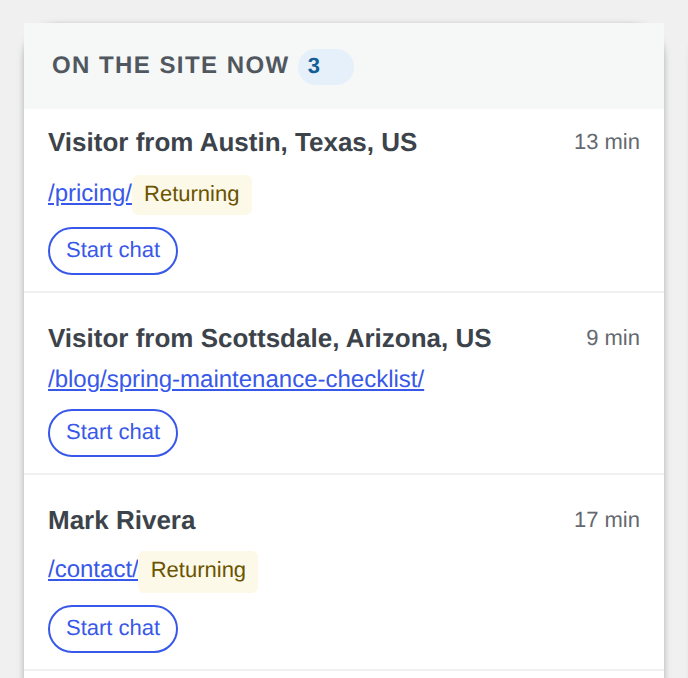
A live list of the people reading your pages at this moment, with the page each one is on and how long they have been there. Start a chat with any of them from the same list.
The On the site now list: each visitor with the page they are reading, how long they have been on the site, and a Start chat button
2Follow each visitor's path
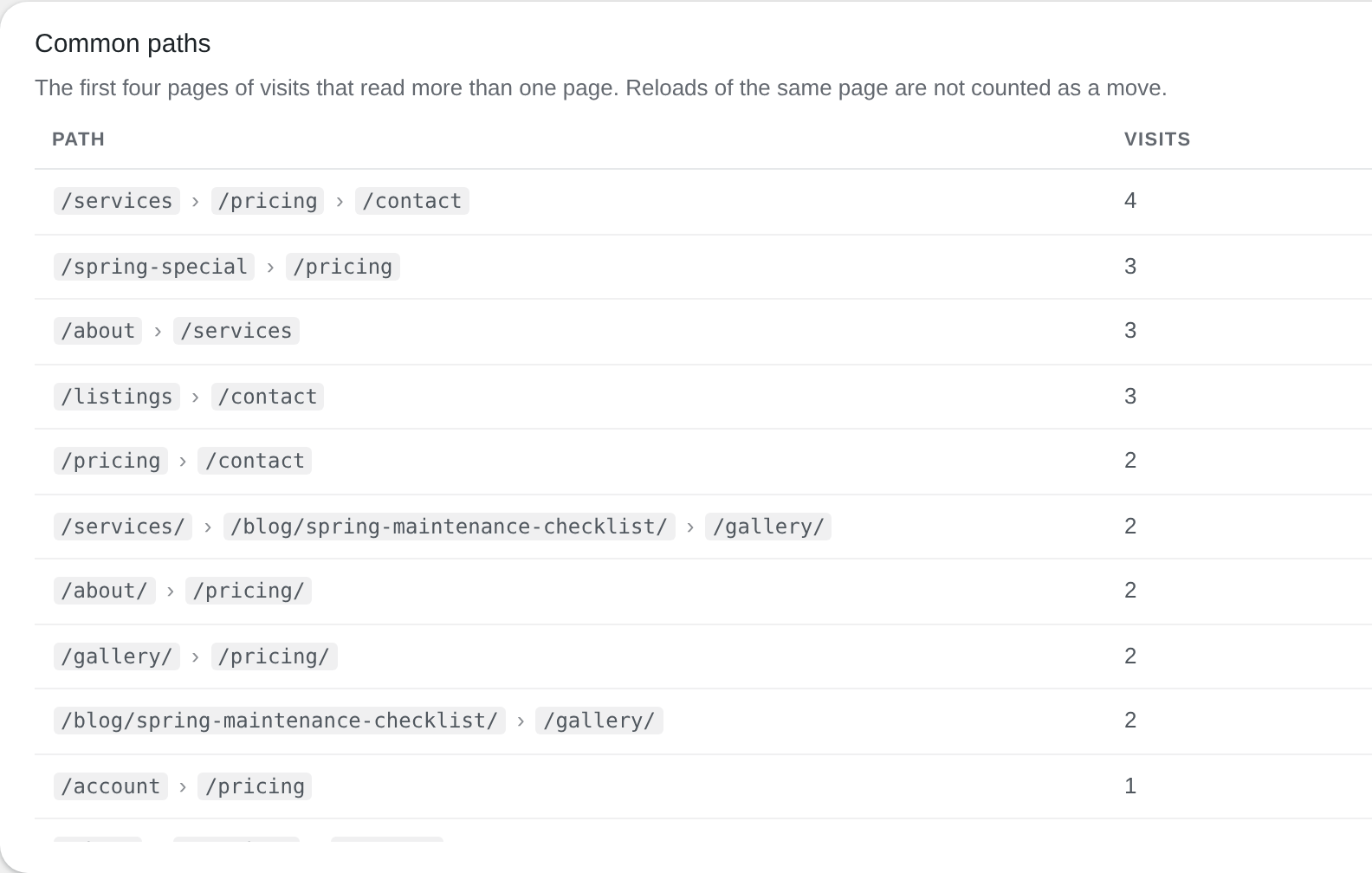
Every page a visitor read, in order, with the time spent on each. The Traffic flow page shows where visits start, where they end and the paths visitors take most.
The Common paths table on the Traffic flow page: the page sequences visitors follow most, with the number of visits for each
3Know the visitor, not just the count
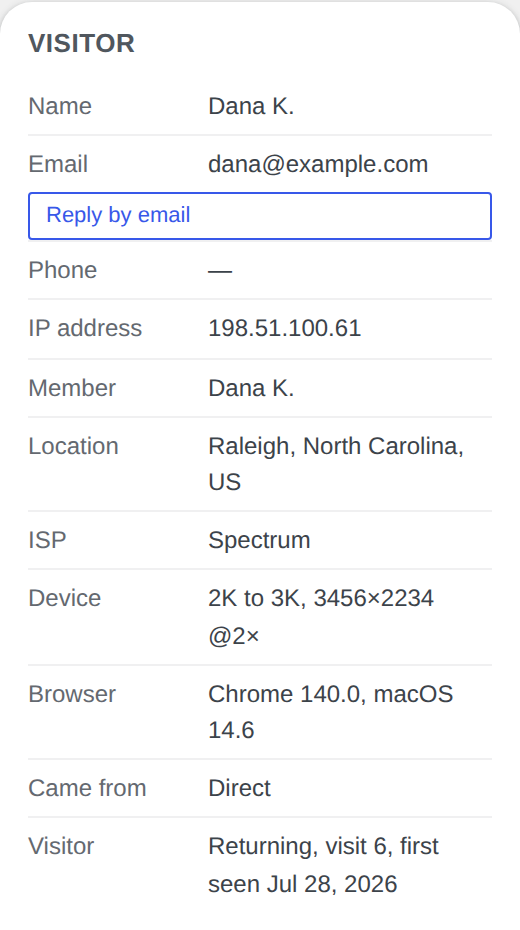
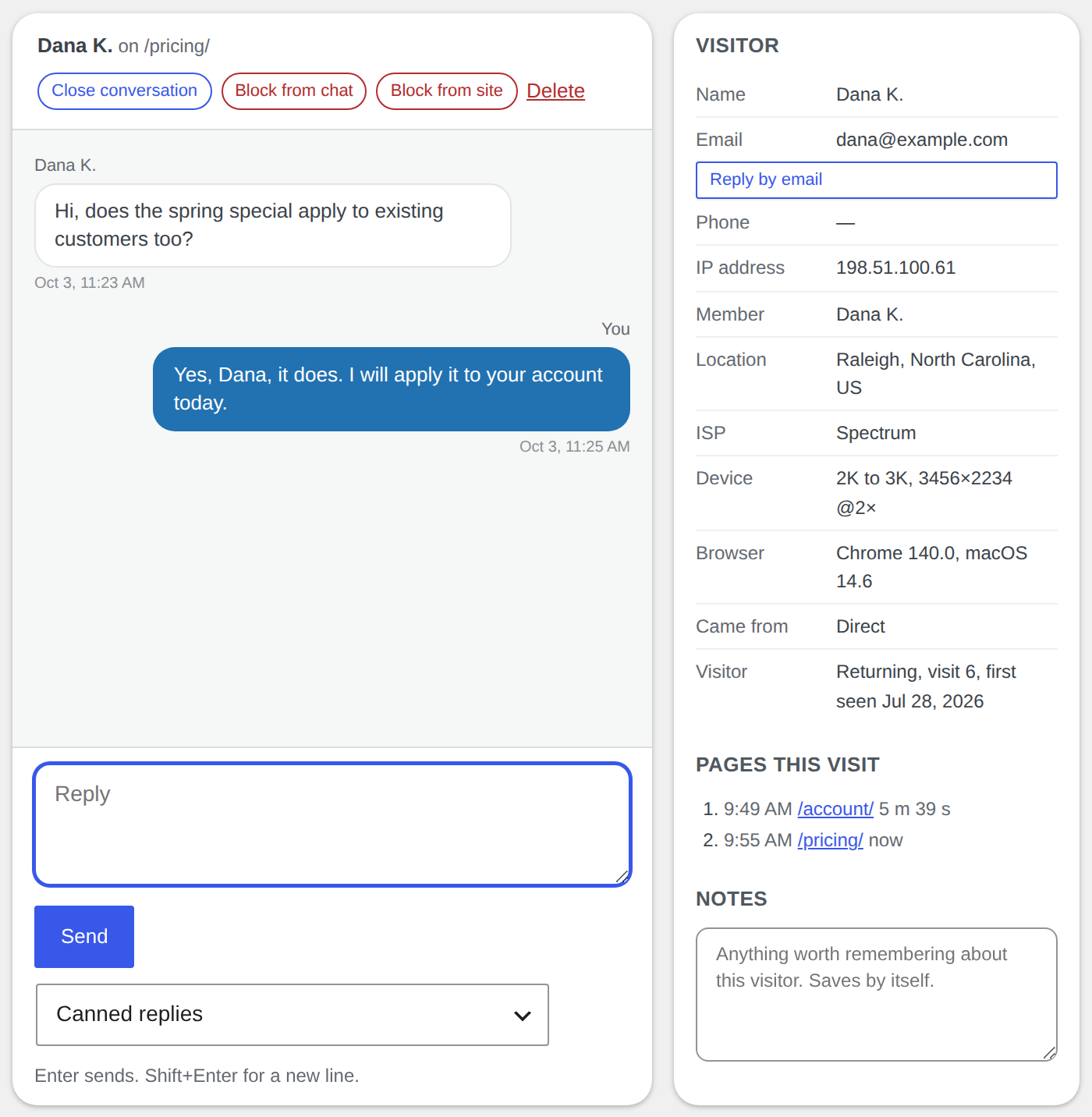
City and state, ISP, screen size, device, browser, language, how many times they have been back and when they first came. A logged-in user shows under their display name.
The visitor panel on the Live Chat page: name, email, IP address, member name, location, ISP, device, browser, where they came from, and the returning-visit count with the first visit date
4Traffic source for every visit
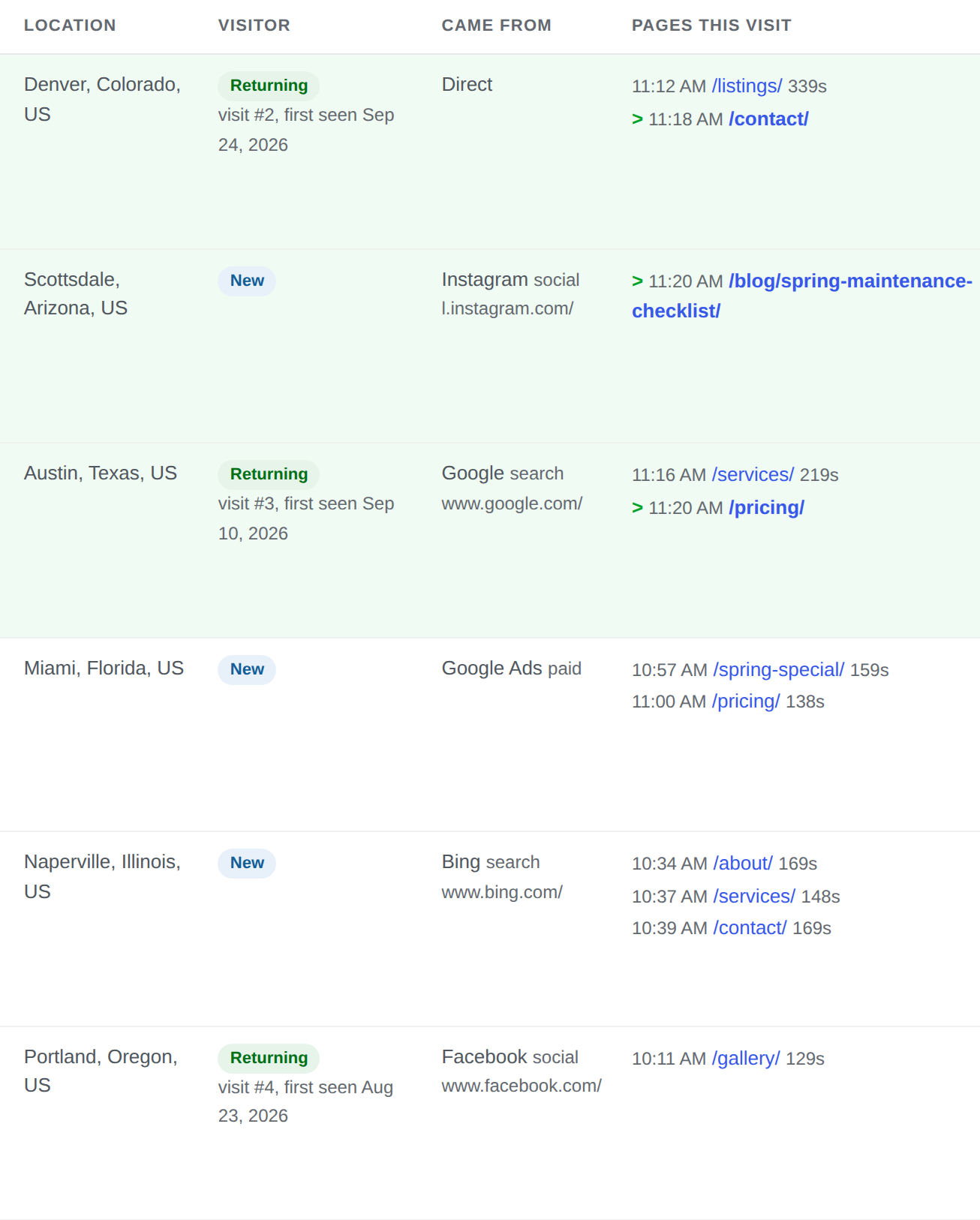
Search, social, a link from another site, an ad click or direct, with the exact page they landed on, so you know which marketing outlet brought each visitor.
Visitor rows with their source: a Google search, Instagram, a Google Ads click, Bing, Facebook or direct, and the pages read in each visit
5Put a name to a repeat visitor
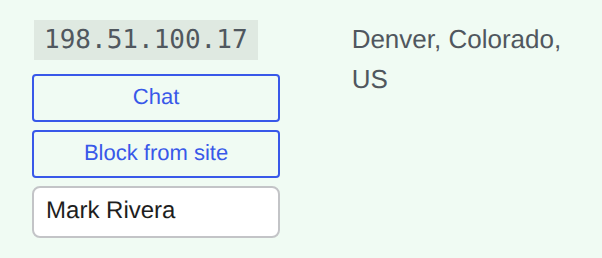
A note box on every visitor row. What you type stays with that visitor and shows on every later visit, in the search box and in the CSV export.
A visitor row with the Chat and Block from site buttons and the note box filled in with a name
6Chat while you see what they are reading
Start the chat yourself from the live list and see the visitor's pages and details next to the conversation. Answer from your computer or your phone; questions you get all the time get a reply you write once and send with one tap. When you are not available to chat, a short form takes their name, email, phone and a brief message.
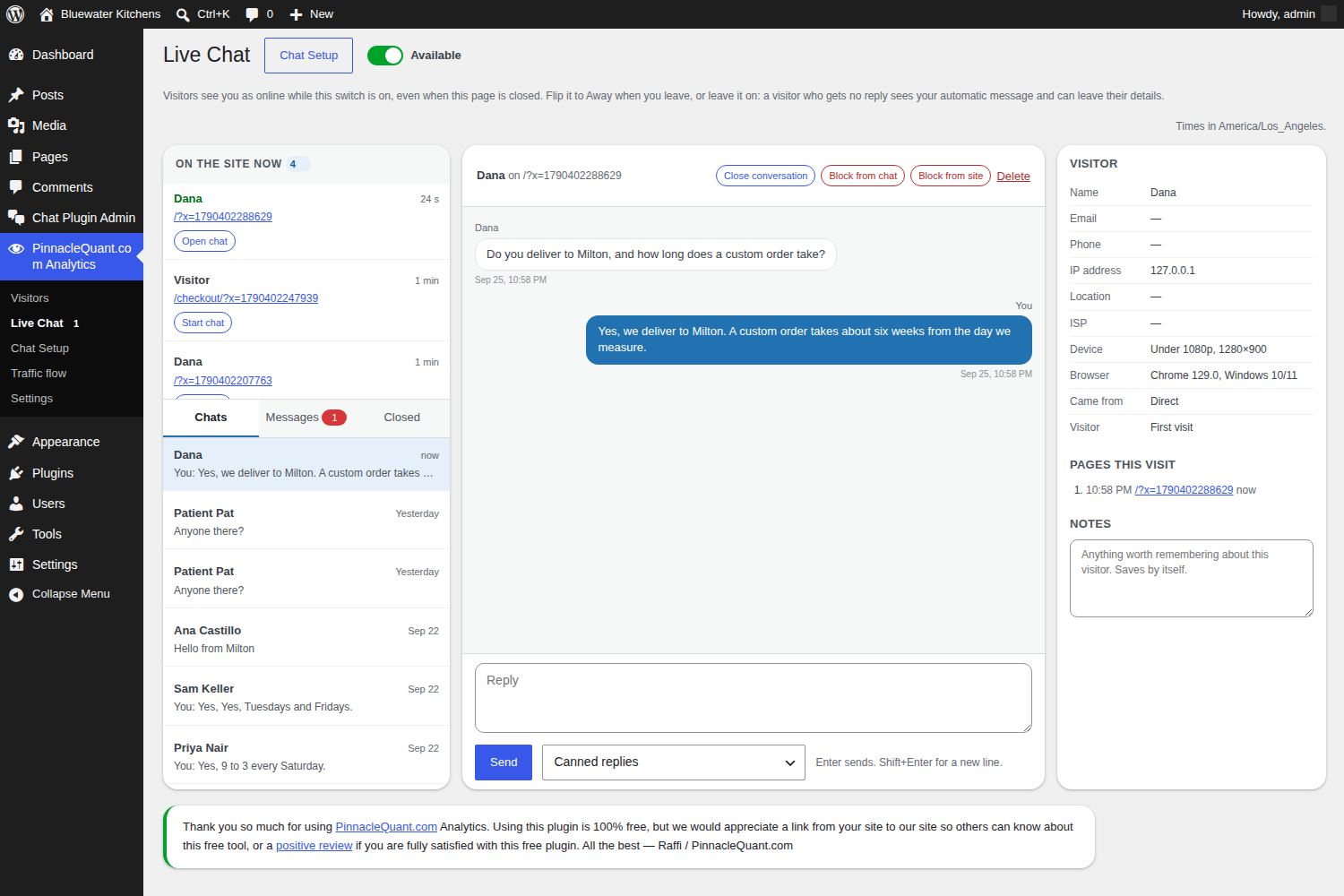
The Live Chat page: a conversation with a visitor beside a panel showing their details and the pages they are reading
7One click to block
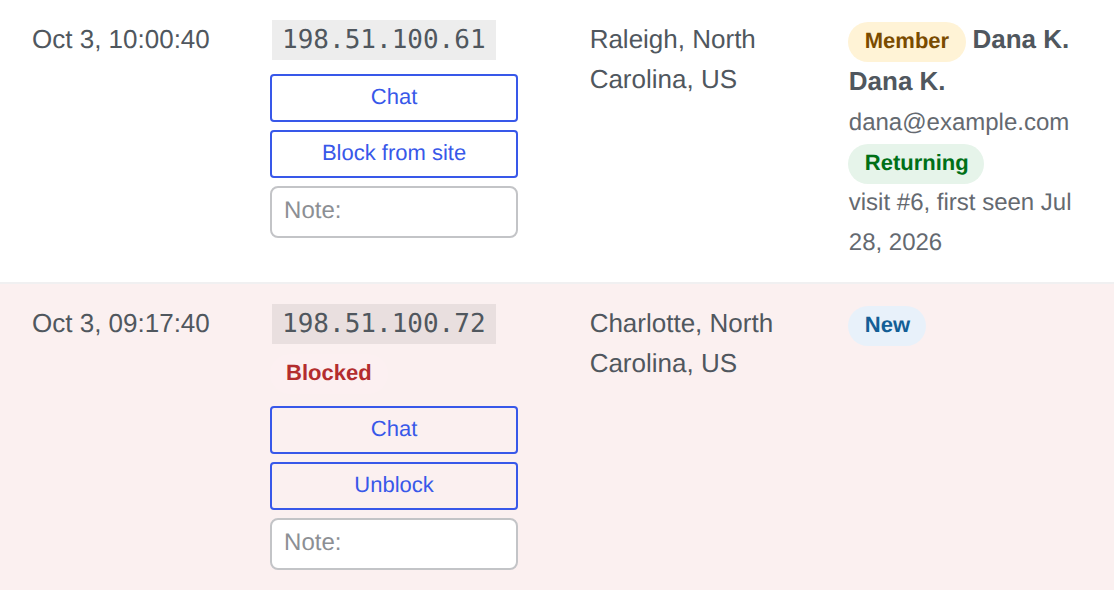
Block a visitor from the chat, or from the whole site, from the same row. One click to undo.
Two visitor rows: one with the Block from site button, one already blocked with an Unblock button
8Yours, on your own server, open source
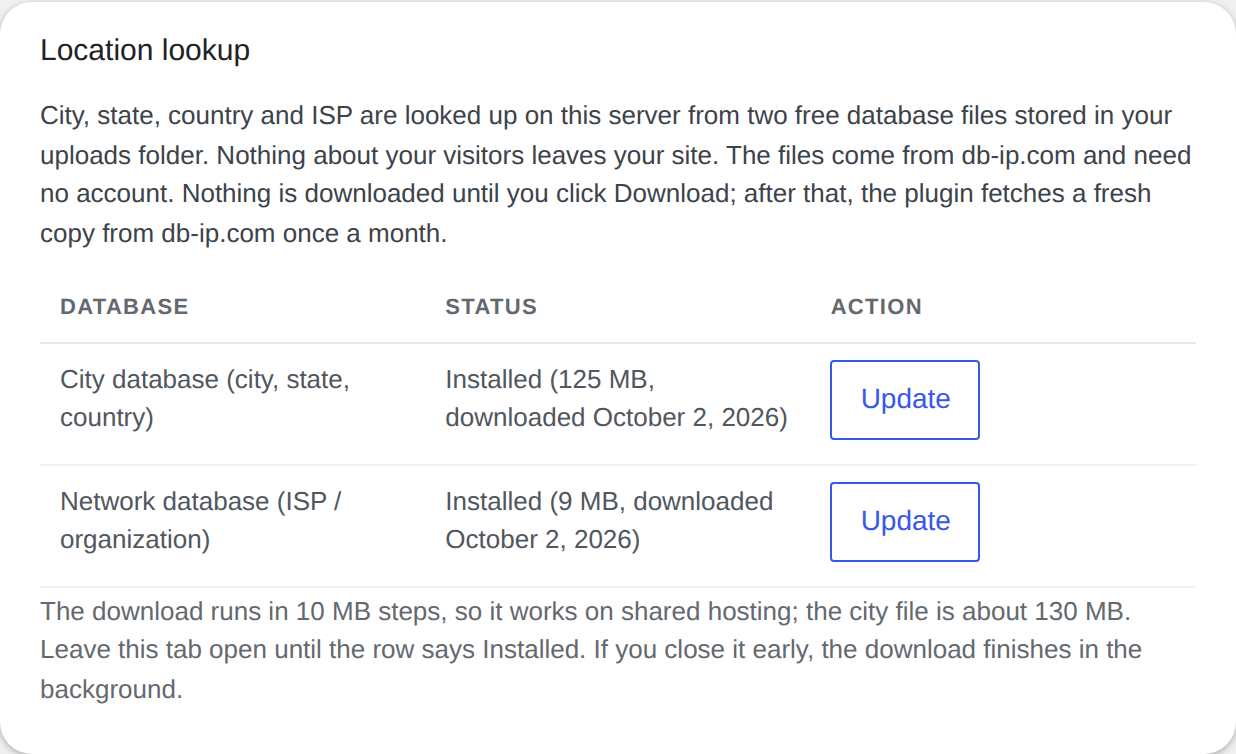
Everything lives in your own WordPress database, nothing is sent anywhere, and no outside script loads in the visitor's browser. Your pages stay just as fast: the plugin adds one tiny file, smaller than a photo thumbnail, that loads only after your page is already on the visitor's screen. Location lookups run on your server from two free files you download once. GPL v3 open source, no account, no paid tier, no limits.
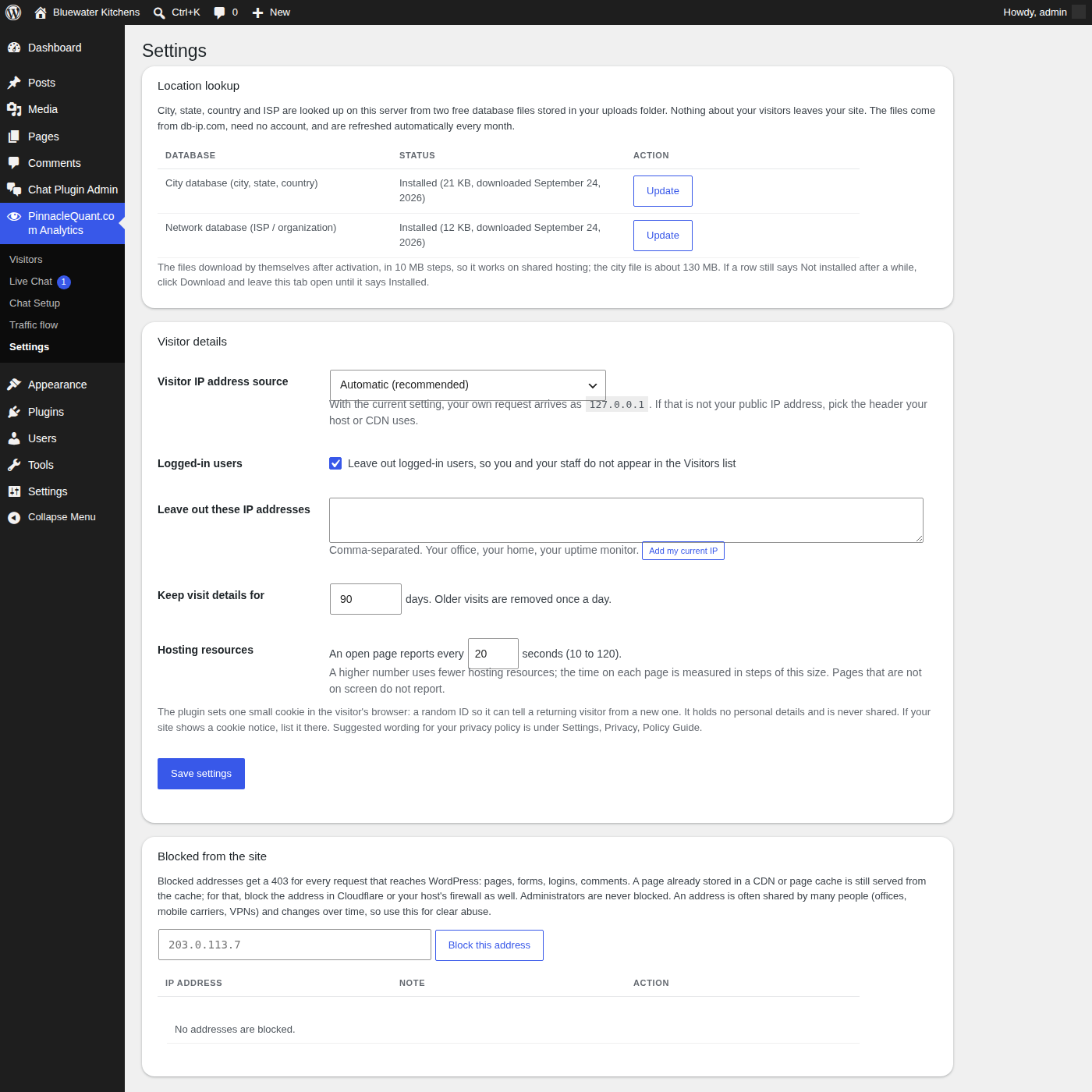
The Location lookup section of the Settings page: the two free location files installed on your own server
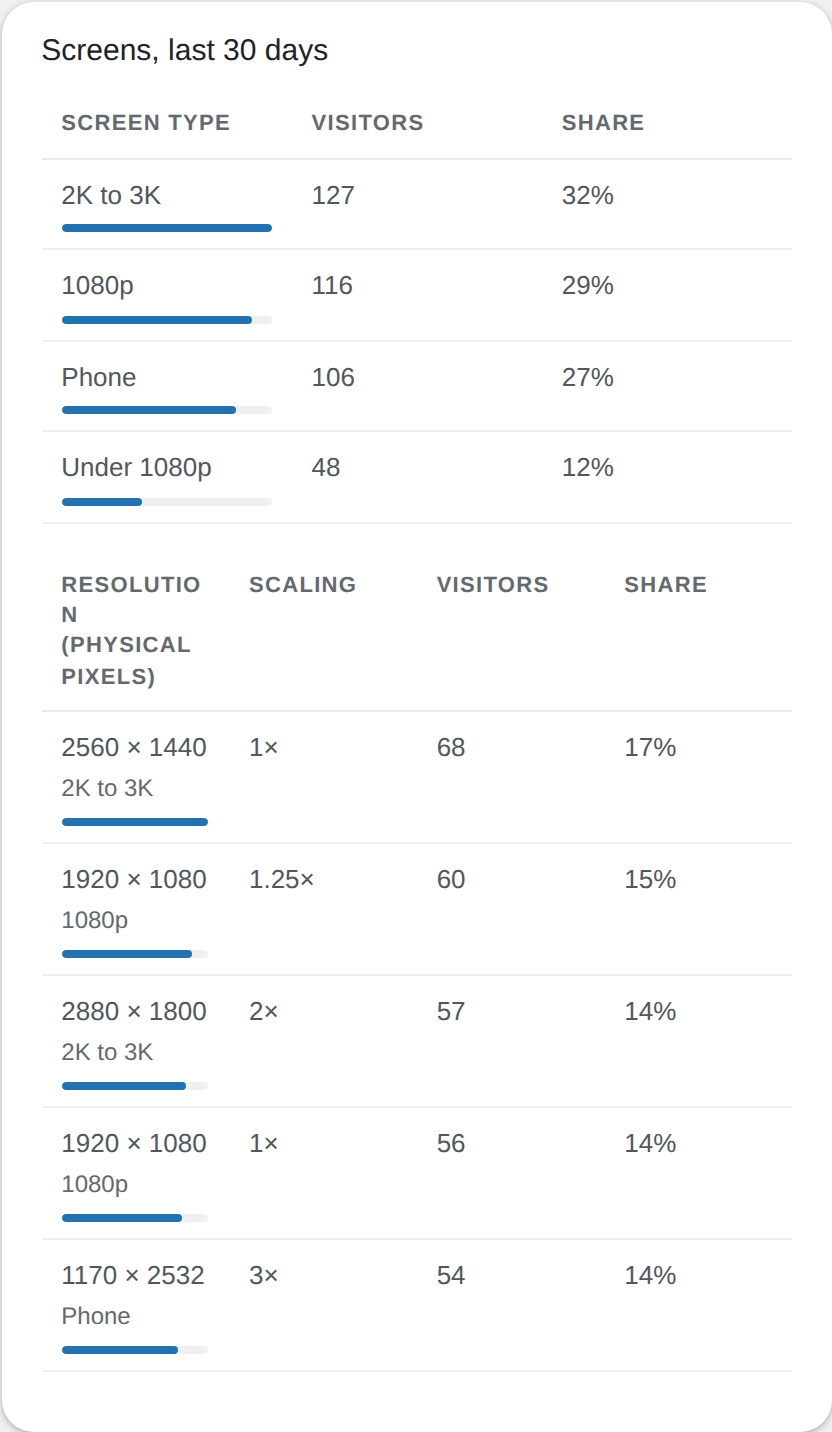
9See which screens your visitors use
A breakdown of screen sizes and devices, phone to large monitor, so you know what your visitors are looking at your pages on and design for it.
Screens, last 30 days: the share of visitors by screen type and by exact resolution
10Clean numbers
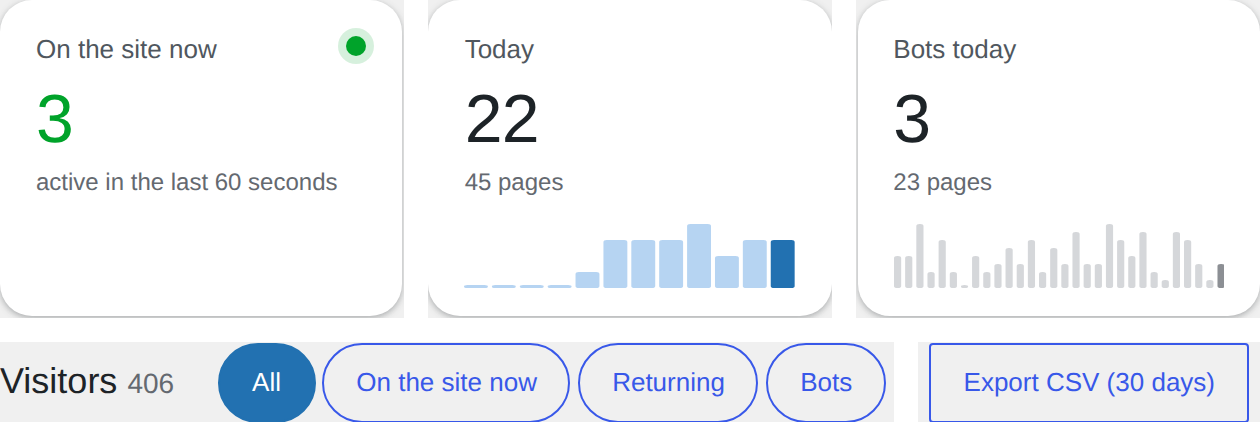
Crawlers are counted apart from people, your own visits are left out, old data is removed after the number of days you choose, and everything exports to CSV in one click.
The summary cards for visitors on the site now, today and bots today, with the filters and the Export CSV button
HOW TO

Install in two minutes. Free key by email.

PinnacleQuant.com Analytics and the Live Chat add-on, step by step.
How to install PinnacleQuant.com Analytics and the Live Chat add-on and get your free key, in six steps

I needed a better analytics system for my own website: real-time traffic flow, returning visitors, and a way to chat with a visitor who has a question. It had to be fast and responsive, and I did not want my traffic data handed to a third party. So I built a WordPress plugin that gives me everything I need to serve my clients. It is already built, so I decided to give it away to other WordPress webmasters who are serving their audiences. Why not?

If you run a WordPress site and want real-time analytics and data in a clear, easy way, where your visitors came from, the device they use, their monitor size, their browser, which pages they read and whether they came back, this 100% free WordPress plugin is yours. Add the free Live Chat add-on and help them while they are on your site.

PinnacleQuant.com Analytics
Real-time analytics on your visitor traffic: who is on your site now, where they came from, device, monitor size, browser, returning visitors, traffic flow. 100% free WordPress plugin.
Live Chat add-on
Real-time chat with the people on your site, from your WordPress admin or your phone. A form takes their name, email, phone and a brief message when you are not available. Free with a key sent by email.

By downloading either plugin you accept the GPL v3 license and the terms in the Download section below.

WHAT

What is PinnacleQuant.com Analytics?

Analytics is the systematic computational analysis of data. PinnacleQuant.com Analytics is a free WordPress plugin that does exactly that for your own visitor traffic: it measures every visit on your own server, in real time, and shows you the results in plain tables and charts inside your WordPress admin. No account, no outside service, no data leaving your site.

Install it, open the Visitors page, and know your stats within a minute. It works on every page and post, across all devices: desktop, tablet and phone.
Real-time analytics
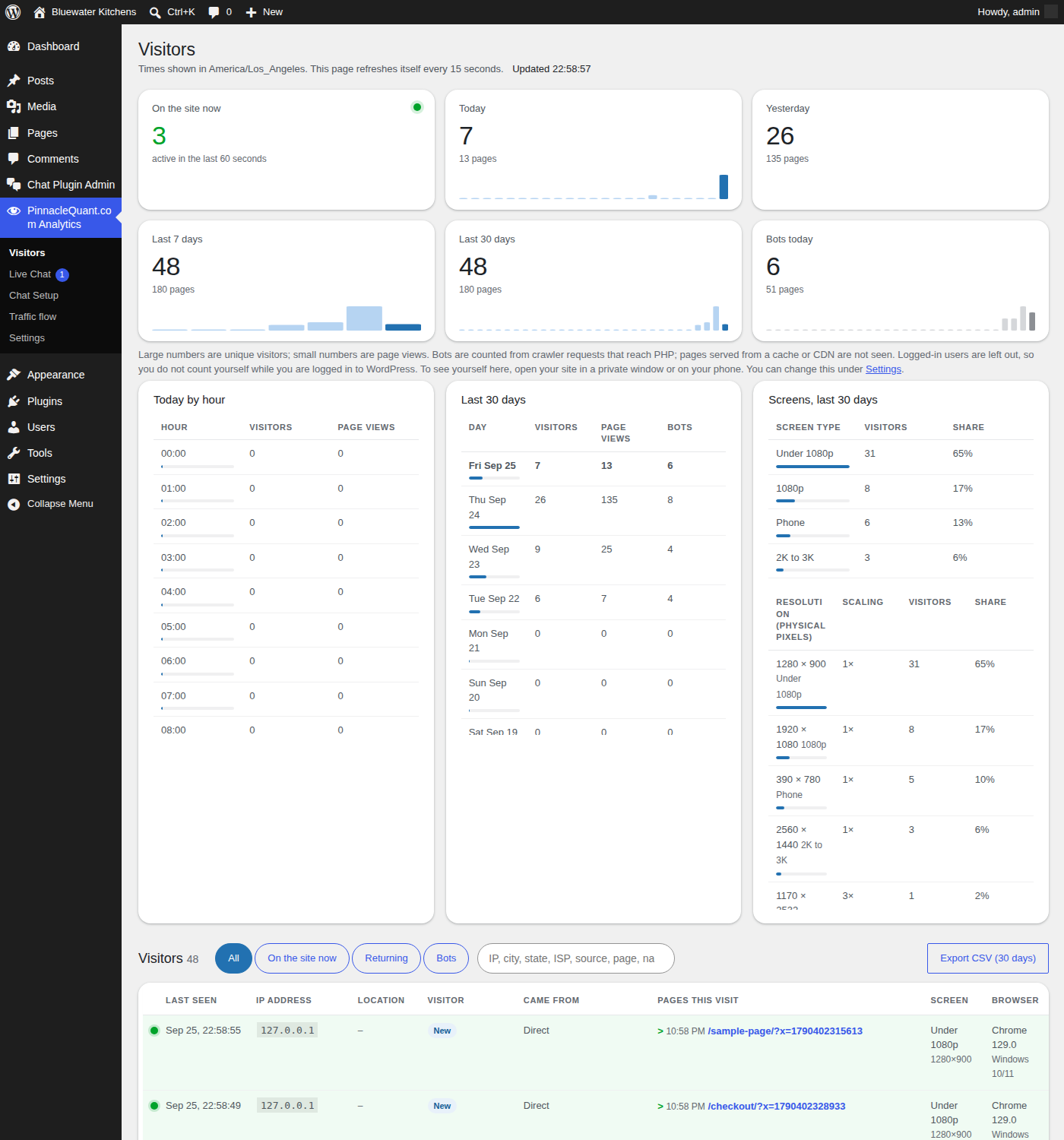
Who is on the site now, today, yesterday, the last 7 and 30 days, page views, and how many of the requests were bots, each with its own chart. The page refreshes itself every 15 seconds.
Know your visitors
Where each visitor came from: a Google, YouTube, Microsoft, Facebook, Instagram, TikTok, X, LinkedIn, Pinterest, Reddit, Snapchat or ChatGPT ad, a search engine, an AI assistant, a social post, another site’s link, or the address typed in. Their city and state, the device they are on, their monitor size, their browser and their internet provider, and whether they are a returning visitor and how many times they have been back, so you can open a chat with the ones who keep coming back.
Traffic flow
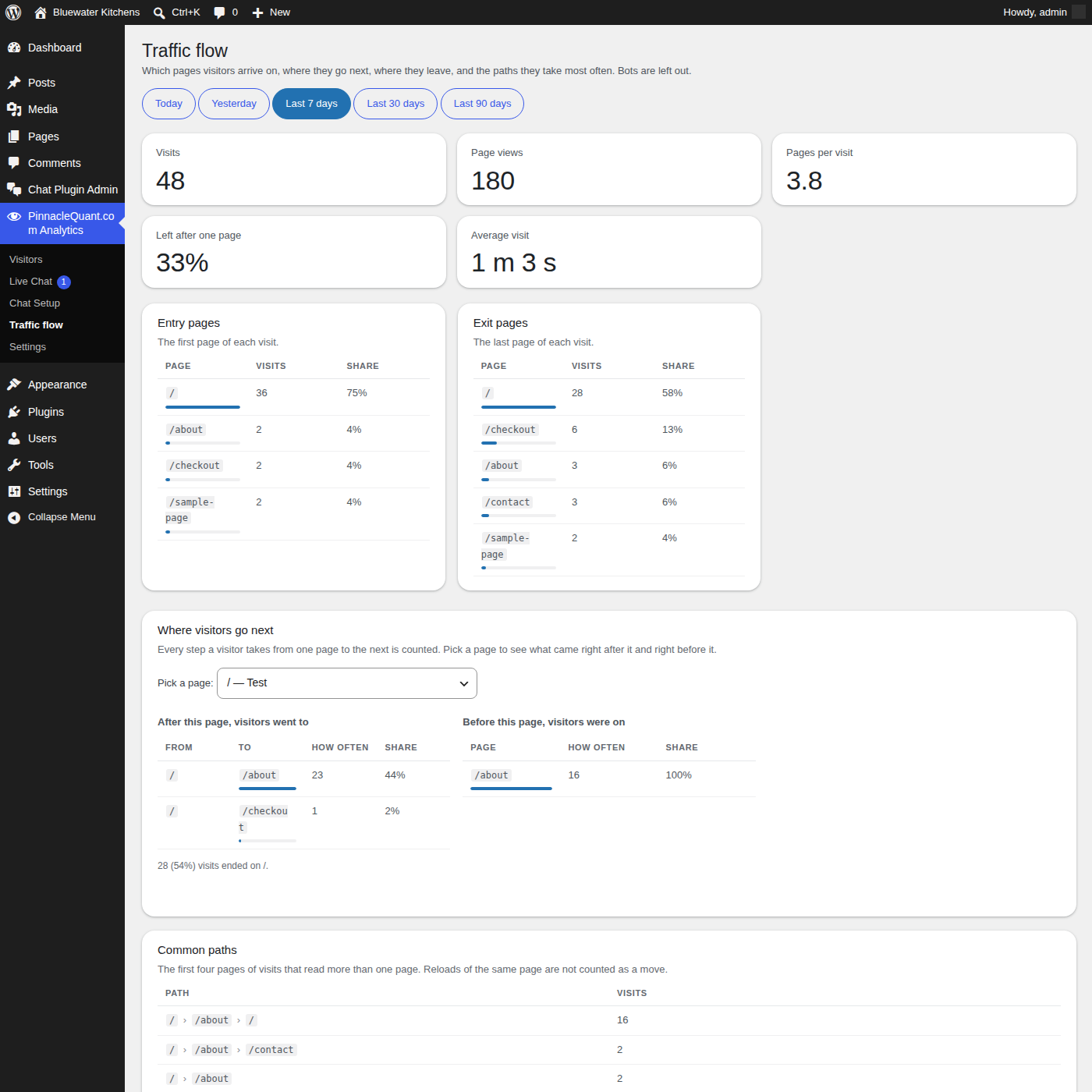
Pick any page and see where visitors went next, where they were before, the most common paths through your site, and the time spent on each page. Track your visitor traffic from the first page to the last.
PinnacleQuant.com Analytics Visitors page: real-time visitor traffic with location, device, monitor size and browser

The Visitors page: who is on the site now, and every visit with its pages.
Traffic flow page: where visitors go after and before each page

Traffic flow: after this page, before this page, and the common paths.
Settings page: leave out your own addresses, block visitors, keep visit details for a chosen number of days

Settings: leave out your own visits, block visitors by address, choose how long to keep visit details.
WHO

Who is this free WordPress analytics plugin for?

Anyone who runs a WordPress site and wants to know their stats without handing their visitor data to an outside company: small businesses, consultants, online stores, bloggers, agencies looking after client sites, and traders or advisors whose visitors expect privacy. If you have ever opened an analytics report and still did not know who was on your site five minutes ago, this is built for you.

Small business and store owners
See which pages bring people in, which ones they leave from, and whether the same people come back. Measure a promotion by the day and the hour.
Agencies and consultants
One plugin per client site, the data on that client’s own server, a CSV export for reports, and the ability to block visitors by address when a site is being abused.
Sites with privacy-minded visitors
No outside scripts, no account, one small cookie with a random ID and no personal details. Suggested privacy-policy wording is included in the plugin.
WHEN

How long does it take to set up?

About two minutes, with no code to paste and no account to open.

1Install
In your WordPress admin: Plugins, Add New Plugin, Upload Plugin, choose the zip file, Install Now, Activate.
2Open the Visitors page
Your first visitors appear as they arrive. The free location files (city, state, internet provider) download by themselves in the first few minutes.
3Leave yourself out
On the Settings page click “Add my current IP” so your own visits do not count. That is the whole setup.
COSTS

What does it cost?

Nothing! Both plugins are 100% free, with no paid tier and no limits on visitors or pages! You’ll be hosting the plugins on your own site or server so your site resource usage will likely increase. Here are some estimates on those metrics:

  • At 2,000 visits a day, Analytics and Live Chat together use about 200 CPU seconds per hour on average and about 600 in the busiest hour. A typical shared hosting plan allows 2,000 to 4,000 per hour. At 500 visits a day, divide by four.
  • Disk: the plugin files are under 1 MB; the location files take about 140 MB; visit data grows about 2.5 MB a day at 2,000 visits and is removed after 90 days by default, so it levels off around 250 MB.
  • Nothing runs while a visitor’s page is not on their screen, and three settings let you lower the load further if you ever need to.

If you have been paying a monthly fee for a chat window or an analytics dashboard, that fee is the saving.

CHAT

Real-time chat with the people on your site: the free Live Chat add-on

Analytics shows you who is on your site right now. The Live Chat add-on lets you talk to them while they are there: a chat button on your pages, a Live Chat page in your WordPress admin, and nothing in between. You see the visitor’s city and the page they are reading, you start the chat or they do, and the whole conversation runs on your own server.
Start the chat yourself
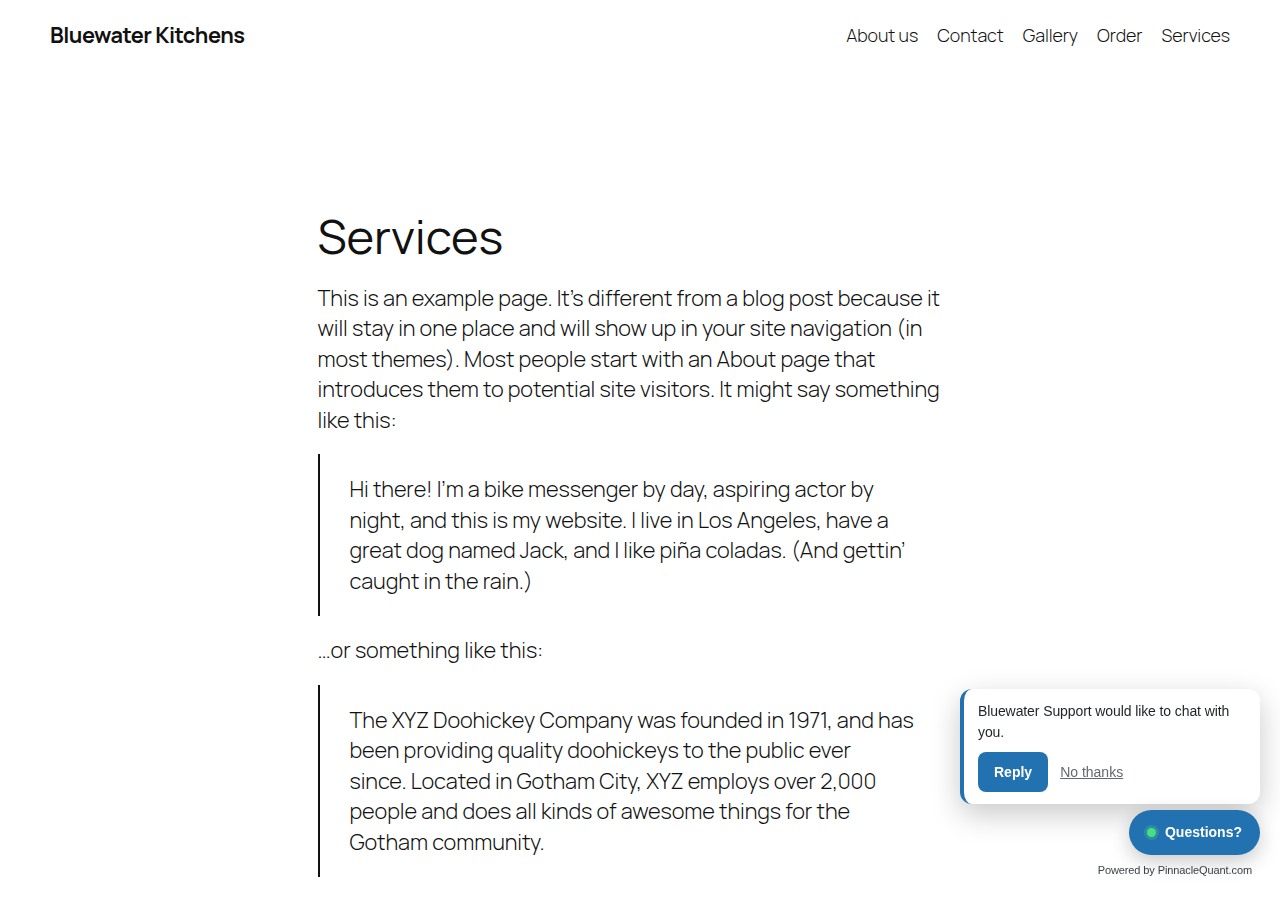
The “On the site now” list shows each visitor with their location and page. Click Start chat and a small bubble asks them if they would like to chat; they can reply or say no thanks.
Answer from anywhere
From your computer or your phone’s browser. A sound when someone writes, canned replies you drop in with one click, and a notes box for anything worth remembering about a visitor.
When you are not available
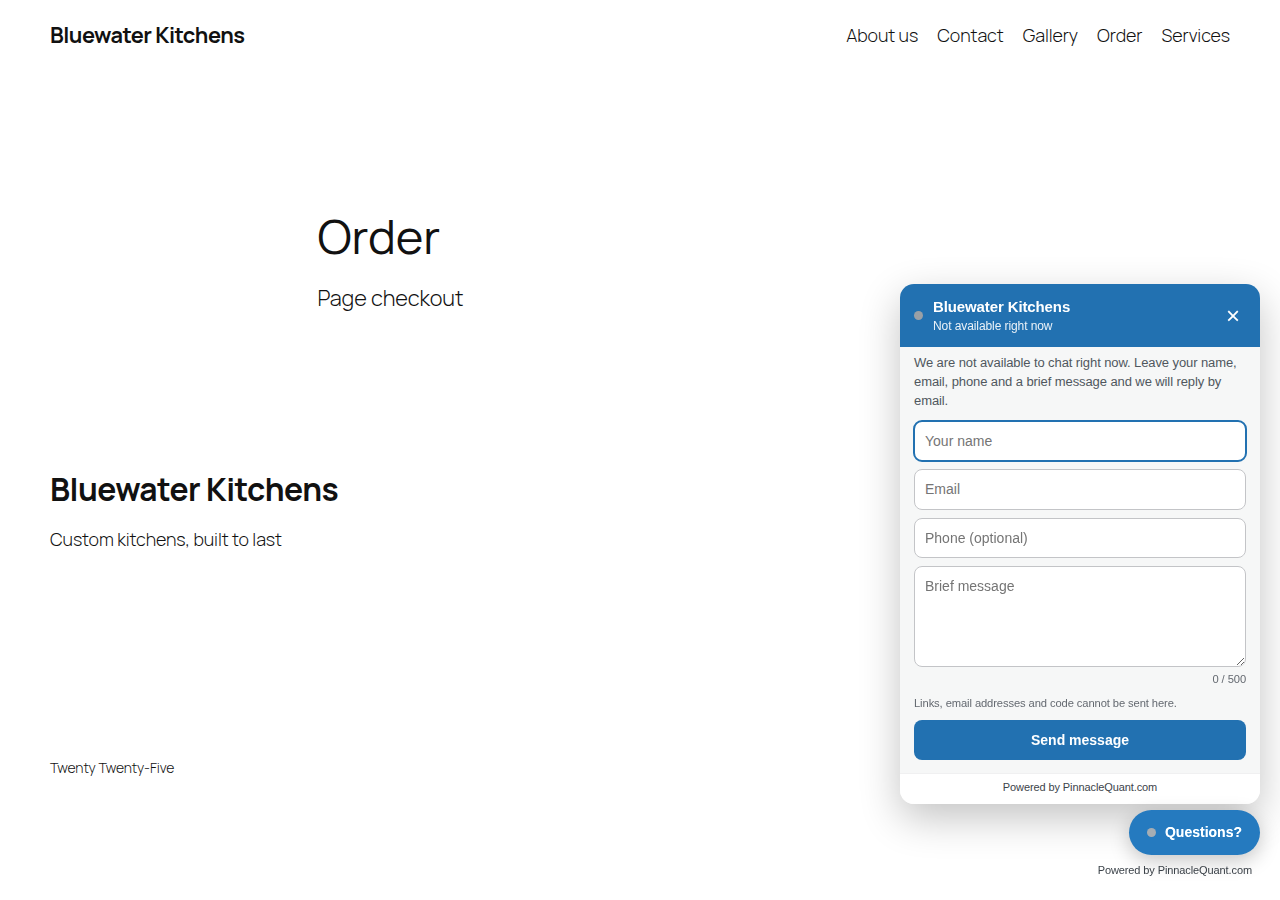
Flip the switch to Away and the button shows your message with a short form: name, email, phone and a brief message. It is emailed to you, and your reply goes back by email. If you are Available but busy, an automatic message tells the visitor you will be right with them.
You stay in control
Block a visitor from the chat or from the whole site with one click. Hide the chat on the pages or posts you choose. A flood limit stops anyone from filling your chat with junk. Your colors, your button text, your wording.
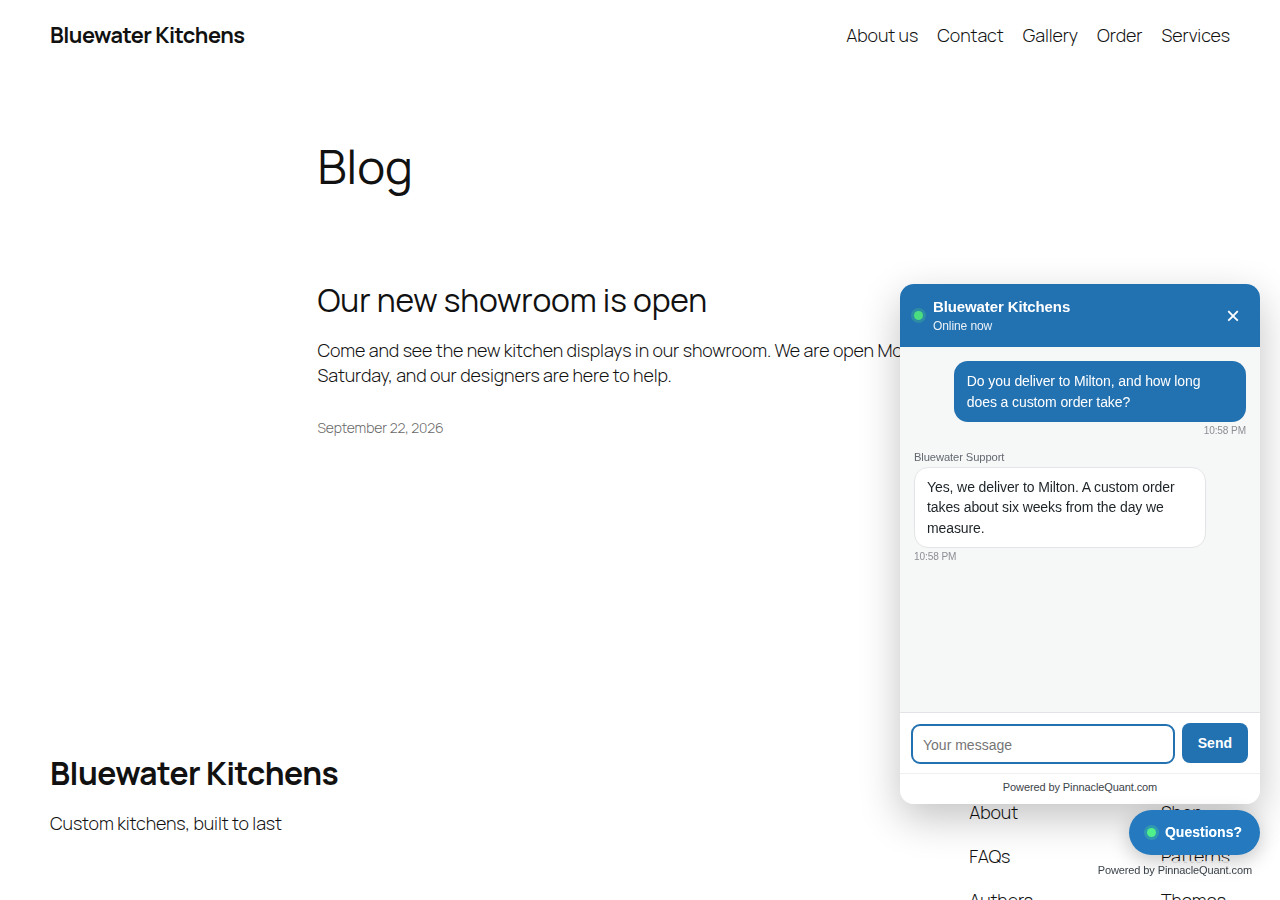
The chat window open on a website with a question and a reply

The chat window on your site, in your colors.
The Live Chat page in the WordPress admin: who is on the site now, the chats, the conversation and the visitor details

The Live Chat page: who is on the site now, your chats, and the visitor’s details.
A chat request bubble on the visitor's side with Reply and No thanks buttons

You start the chat; the visitor decides.
The form visitors see when you are not available: name, email, phone and a brief message

When you are not available: the short form, emailed to you.
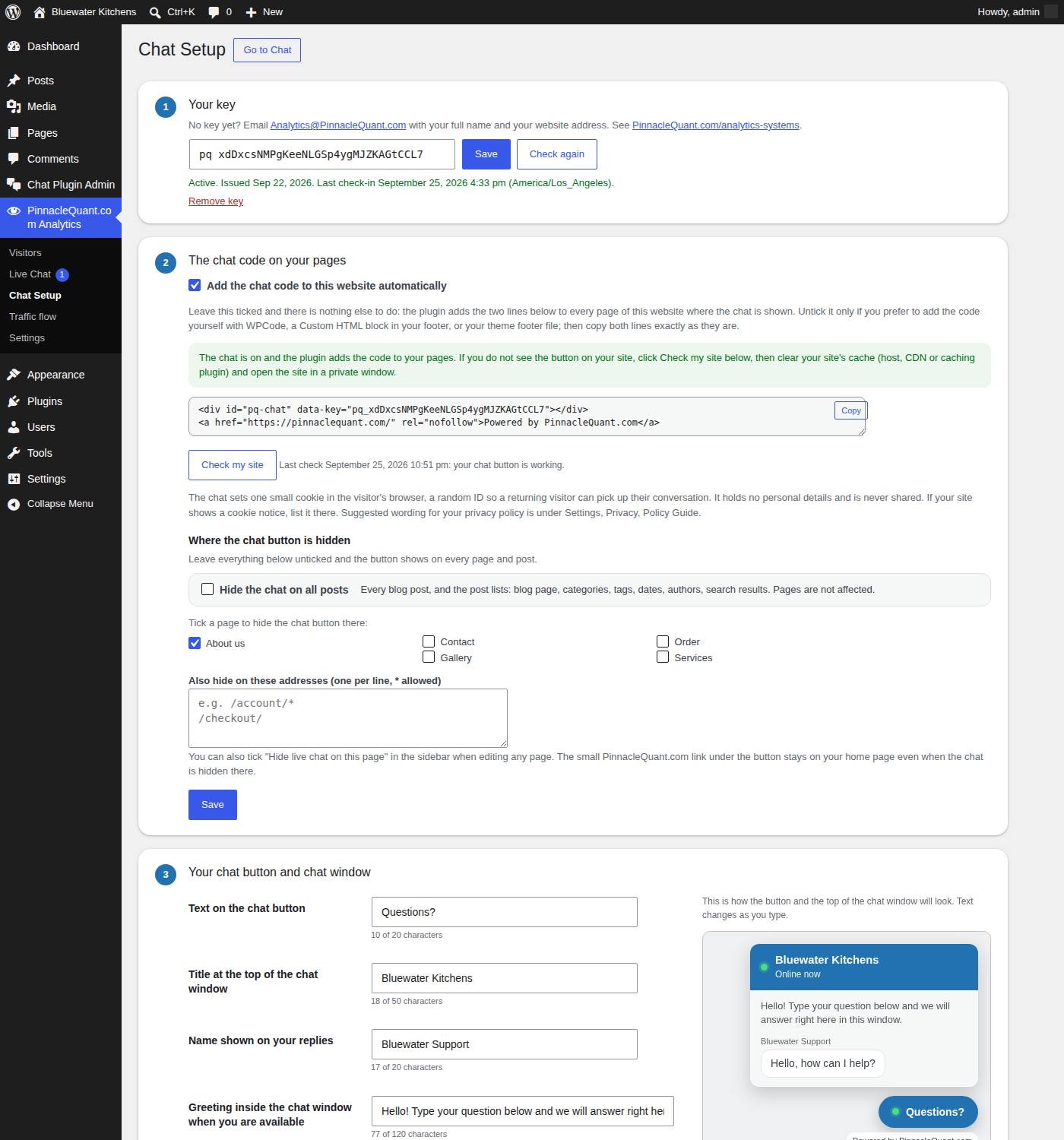
The Chat Setup page with the live preview of the button and the chat window

Chat Setup: pick your colors and words and watch the preview change as you type.
How to get your free key
Email Info@PinnacleQuant.com with your full name and your website address. The key comes back by email. Paste it on the Chat Setup page, click Activate, and the chat button is on your site. The add-on shows a small “Powered by PinnacleQuant.com” line under the chat button, and it works together with the free Analytics plugin, which gives it the live visitor list and locations.
DOWNLOAD

Download the free WordPress plugins

Analytics installs from WordPress.org; the Live Chat add-on is a zip file you download here. Analytics works on its own; the Live Chat add-on needs Analytics and a free key.

PinnacleQuant.com Analytics
Real-time analytics on your visitor traffic. No key needed.

Get it on WordPress.org

Live Chat add-on
Real-time chat with the people on your site. Free key by email.

Download Live Chat (zip)

1. Install Analytics
In your WordPress admin: Plugins, Add New Plugin, search for PinnacleQuant, click Install Now, then Activate. Open the Visitors page.
2. Install Live Chat
Plugins, Add New Plugin, Upload Plugin: choose the Live Chat zip, click Install Now, then Activate. Email Info@PinnacleQuant.com with your full name and website address for your free key.
3. Paste the key
On the Chat Setup page, paste the key, click Activate. Open Live Chat, set the switch to Available, and you are online.

Both plugins are released under the GPL v3 and offered as is. We do our best to keep them working well, and we are not responsible for problems they may cause on a site. We may pause or end a chat key if we find it is being used for something we consider inappropriate; we will always say so by email. Updates are announced on this page. Questions: Info@PinnacleQuant.com.

WHY

Why keep your analytics on your own server?

Because the numbers are yours. Most analytics services work by placing their script on your pages, so every visit is sent to their servers and their script runs in your visitors’ browsers. PinnacleQuant.com Analytics does the systematic computational analysis of data on your own server: each visit is written to your own WordPress database and read back in your admin, nothing is sent anywhere, and there is no outside script for a browser to load. You decide how long visit details stay, whose visits are left out, and who is blocked. That is also why it is fast: there is nothing to fetch from anyone else.

QUESTIONS

Questions people ask before installing

Can I assign someone else to manage chat interaction with my visitors and review my analytics on paid and organic traffic?
Yes. Two ticks: “Let Editors answer chats too” in Chat Setup, and “Let Editors see the Visitors and Traffic flow pages too” in Settings. From then on anyone with the WordPress Editor role can see who is on the site, answer the chat, and read the Visitors and Traffic flow pages, where every visit shows whether it came from an ad, a search engine, an AI assistant, a social post, another site’s link, or was typed in. They can do it from their computer or their phone, and there is no limit to how many people. The settings pages, blocking and the CSV export stay with Administrators.
Where does the data live?
In your own WordPress database, in tables of its own. Visit details are removed after 90 days by default; you choose the number on the Settings page. Deactivating the plugin keeps everything in place; removing it takes its tables with it.
Does it set a cookie?
One small first-party cookie holding a random ID, so a returning visitor is counted as returning. It holds no personal details and is not shared with anyone.
Pages and posts?
Both. Every page and post is counted, and the chat button can show on both. If you would rather have the chat on pages only, one tick in Chat Setup hides it on all posts.
Why do I not see myself in the list?
Logged-in users are left out, so your own work in the admin does not count as traffic. Open your site in a private window and you will see yourself arrive.
What happens when I am not available to chat?
The chat button shows your away message with a short form: name, email, phone and a brief message. Links, email addresses and code cannot be sent through it. The message reaches you by email, and your reply goes back the same way.
What does the chat add-on send to PinnacleQuant.com?
Once a day it checks in with your key, the plugin versions and whether the chat code is in place on your site, so we can help if something is off. No visitor data and no messages are sent.
Will it slow my site or my hosting?
No. There are no outside scripts. The plugin adds about 40 KB, which the browser keeps after the first page. At 2,000 visits a day the two plugins use about 200 CPU seconds an hour on the server, well inside a typical hosting allowance, and three settings let you lower it further.
How do updates work?
Upload the new zip under Plugins, Add New Plugin, Upload Plugin, and choose Replace current with uploaded; your settings and data stay in place. Updates are announced on this page, and once Analytics is listed on WordPress.org it will update from your admin like any other plugin.

“Wealth hastily gotten will dwindle, but those who gather little by little will increase it.” – Proverbs 13:11

Powered by PinnacleQuant.com